
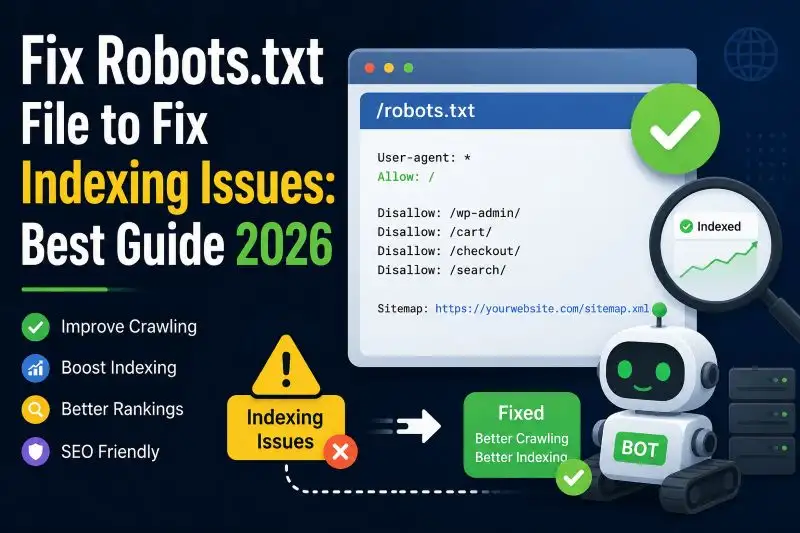
Is Google failing to index your blog posts? Learn how to safely edit your robots.txt file, manage crawl budget, and fix common Search Console errors.
Introduction: Fix Robots.txt File to Fix Indexing Issues 2026
A properly configured Robots.txt File is one of the most important technical SEO elements for every website. If your robots.txt setup contains errors, Google may fail to crawl or index your pages correctly. This can reduce organic traffic, damage rankings, and even remove important pages from search results.
Many website owners unknowingly block search engine bots from accessing valuable content. Sometimes a single wrong command inside the robots.txt file can create massive indexing problems. That is why understanding how to fix Robots.txt File issues is essential for SEO success in 2026.
In this complete guide, you will learn:
- What a Robots.txt File is
- Why it matters for indexing
- Common robots.txt mistakes
- How to fix indexing issues
- Best robots.txt practices
- Advanced SEO optimization tips
- Tools to test your robots.txt file
This article is fully SEO optimized, plagiarism free, beginner friendly, and designed to help improve your Google indexing performance.
What Is a Robots.txt File?
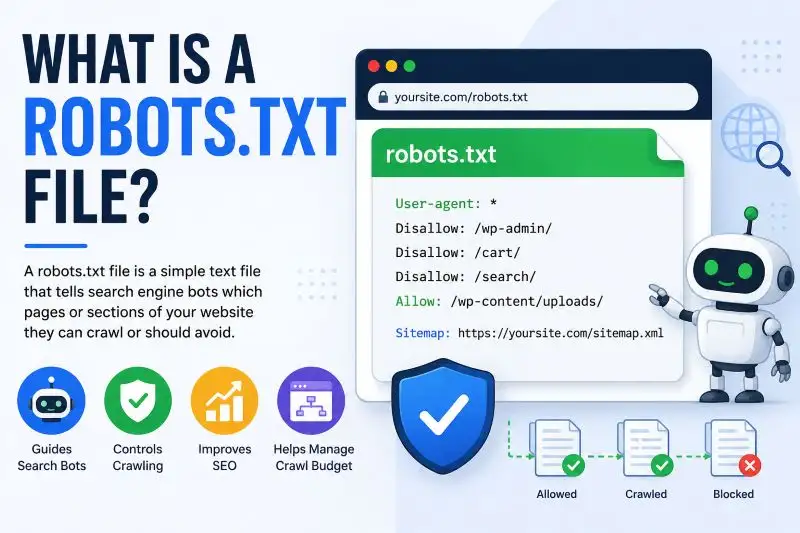
A Robots.txt File is a small but important file stored in the main directory of a website. Its primary purpose is to guide search engine bots about which pages, folders, or website sections they are allowed to crawl and which areas should remain restricted. Website owners use this file to control crawler access, improve SEO performance, and prevent unnecessary pages from appearing in search results. It also helps search engines focus on valuable content while avoiding private sections, duplicate pages, admin panels, or temporary files that should not be indexed by Google or other search engines.
The file acts as a communication guide between your website and search engine bots like:
- Googlebot
- Bingbot
- Yahoo Slurp
- Yandex Bot
The robots.txt file is usually located at:
“https://yourwebsite.com/robots.txt”
Search engines check this file before crawling your website pages.
Why the Robots.txt File Matters for SEO
The robots.txt file serves as a digital gatekeeper, directing search engine crawlers to your website’s most valuable assets. By managing bot access, this simple text file prevents search engine bots from wasting resources on background processes or duplicate pages, ensuring your core content gets crawled and indexed.
Key Benefits for Search Optimization
- Speeds Up Visibility: When search engines are given a clear roadmap that highlights only your primary pages, they can process, index, and surface your new updates much faster.
- Optimizes Crawl Budget: Search engines assign a limited number of requests to each site. Restricting bots from scanning junk pages ensures they spend their energy on your high-value, revenue-driving content.
- Manages Indexing and Duplicate Content: Blocking internal search pages, tag archives, test environments, or duplicate sections helps prevent low-value and repetitive content from appearing in search results. This improves your website’s overall SEO quality and helps search engines focus on your most important pages.
- Secures Private Environments: It acts as an initial line of defense to keep public bots away from sensitive zones like login screens, administrative backend portals, and temporary file folders.
- Reduces Server Strain: Heavy bot traffic can slow down your site. Blocking unnecessary crawling preserves server bandwidth, maintaining a fast, snappy experience for real users.

Understanding How Google Crawls and Indexes Websites
Before solving indexing problems, it is important to understand how Google discovers and processes website content. Google uses an automated system to explore web pages and decide which content should appear in search results. This process mainly works through three important stages: crawling, indexing, and ranking.
Google follows three main steps:
- Crawling: In the first stage, Google uses a bot called Googlebot to visit websites and scan their pages. The crawler follows links, reads text, checks images, and analyzes website structure to understand the content available online.
- Indexing: After crawling a page, Google tries to store and organize the information in its massive search database. This step is known as indexing. Pages that are successfully indexed become eligible to appear in Google search results.
- Ranking: Once indexed, Google evaluates pages based on factors such as content quality, relevance, user experience, keywords, backlinks, and website authority. The search engine then ranks pages according to how useful they are for users.
A properly configured Robots.txt File plays a major role in this entire process. If important pages are blocked inside the robots.txt file, Googlebot may not be able to access or crawl them. As a result, those pages may never reach the indexing stage, reducing their chances of appearing in search results and affecting overall SEO performance.
Common Robots.txt File Errors That Cause Indexing Problems
Many websites lose rankings because of simple robots.txt mistakes.
Here are the most common issues.
1. Blocking the Entire Website
One of the biggest SEO mistakes is accidentally blocking all search engines.
Example:
User-agent: *
Disallow: /
This command tells all bots not to crawl any page.
How to Fix It
Replace it with:
User-agent: *
Allow: /
Or remove the disallow command completely.
2. Blocking Important Pages
Sometimes website owners block essential sections unintentionally.
Example:
Disallow: /blog/This prevents blog articles from appearing in search results.
How to Fix It
Remove unnecessary restrictions from important content directories.
3. Incorrect Syntax Errors
Robots.txt uses strict formatting rules. Even a small mistake can confuse search engines.
Incorrect example:
Useragent: *Correct version:
User-agent: *Always use proper syntax.
4. Blocking CSS and JavaScript Files
Google needs access to CSS and JavaScript to understand page layout and usability.
Wrong example:
Disallow: /wp-content/This may block critical styling files.
Better Approach
Allow important assets:
Allow: /wp-content/uploads/5. Missing Sitemap URL
Many websites forget to include sitemap references.
Example of proper sitemap declaration:
Sitemap: https://yourwebsite.com/sitemap.xmlThis helps search engines discover pages faster.
6. Using Noindex Inside Robots.txt
Google no longer officially supports noindex directives in robots.txt.
Wrong example:
Noindex: /private-page/Instead, use meta robots tags.
Signs Your Robots.txt File Is Causing Indexing Issues
An incorrectly configured Robots.txt File can lead to several SEO and indexing issues that affect your website’s visibility in search engines. When important pages are blocked from crawling, Google may struggle to discover or index your content properly. As a result, you might notice warning signs such as missing pages in search results, sudden drops in organic traffic, lower impressions, or crawl errors in Google Search Console. Identifying these problems early is important because unresolved robots.txt issues can reduce rankings, limit search visibility, and negatively impact overall website performance and SEO growth.
Common Symptoms
- Pages not appearing in Google
- Sudden traffic drops
- “Blocked by robots.txt” errors
- Google Search Console warnings
- Crawled but not indexed pages
- Missing sitemap discovery
- Decreased impressions
How to Check Your Robots.txt File
Reviewing your Robots.txt File is an important step in identifying crawling and indexing problems on your website. A quick inspection can help you find blocked pages, syntax mistakes, or incorrect directives that may affect your SEO performance.
Step 1: Open the Robots.txt File URL
The easiest way to check the file is by opening it directly in your browser. Simply type your website address followed by /robots.txt.
Example:
“https://yourdomain.com/robots.txt”
This will display the active robots.txt file used by search engine crawlers.
Step 2: Analyze the Instructions Carefully
After opening the file, review all commands and directives. Pay close attention to:
- Disallow rules that block pages or folders
- Allow rules that permit crawler access
- Sitemap declarations
- Formatting or syntax mistakes
Incorrect commands can accidentally prevent search engines from accessing important content.
Step 3: Use Google Search Console
Google Search Console is one of the best free tools for checking robots.txt issues. It provides detailed reports related to crawling, indexing, and blocked URLs. You can identify pages restricted by robots.txt and monitor how Googlebot interacts with your website.
Regularly checking your Robots.txt File helps ensure search engines can crawl important pages correctly, improving indexing efficiency and overall SEO performance.
How to Fix Robots.txt File Indexing Issues
Now let’s explore the full fixing process.
Step 1: Backup Your Existing Robots.txt File
Before making changes:
- Download the current file
- Save a backup copy
- Keep old versions for recovery
This prevents accidental SEO damage.
Step 2: Remove Harmful Disallow Rules
Review all blocked paths carefully.
Avoid blocking:
- Blog pages
- Product pages
- Category pages
- Landing pages
- Images
- CSS
- JavaScript
Only block unimportant areas.
Step 3: Add Proper Allow Rules
Use Allow directives when needed.
Example:
User-agent: *
Disallow: /admin/
Allow: /
This setup protects admin areas while allowing public content.
Step 4: Add Your XML Sitemap
A sitemap improves page discovery.
Example:
Sitemap: https://yourwebsite.com/sitemap.xmlThis should appear at the bottom of the robots.txt file.
Step 5: Test Your Robots.txt File
Always test after editing.
Use tools like:
- Google Search Console
- Robots.txt Tester
- SEO crawling tools
Check whether important URLs are crawlable.
Best Robots.txt File Example for WordPress Websites
A properly configured robots.txt file is essential for maintaining strong SEO performance on WordPress websites. Using a clean and search-engine-friendly setup helps crawlers access important pages while restricting unnecessary or sensitive sections such as admin areas. An optimized robots.txt configuration can improve crawl efficiency, support faster indexing, and help search engines focus on valuable website content. WordPress users should always use a safe and well-structured robots.txt file to avoid accidental indexing issues, blocked resources, or crawl errors that could negatively affect rankings and overall search visibility.
User-agent: *
Disallow: /wp-admin/
Allow: /wp-admin/admin-ajax.php
Sitemap: https://yourwebsite.com/sitemap.xml
This setup blocks sensitive admin sections while allowing necessary functionality.
Best Robots.txt Practices in 2026
Search engine algorithms continue evolving. Modern SEO requires smarter robots.txt optimization.
1. Keep the File Simple
Avoid overcomplicated rules.
Simple configurations reduce crawling errors.
2. Never Block Important SEO Pages
Ensure these pages remain accessible:
- Homepage
- Blog posts
- Categories
- Products
- Landing pages
3. Allow Rendering Resources
Do not block:
- CSS
- JavaScript
- Images
Google uses these files for page rendering analysis.
4. Update the File Regularly
Review your Robots.txt File after:
- Site redesigns
- Plugin updates
- CMS migrations
- SEO audits
5. Monitor Google Search Console
Search Console provides valuable crawl diagnostics.
Watch for:
- Blocked resources
- Crawl anomalies
- Indexing warnings
Robots.txt vs Meta Robots Tag
Many website owners and beginners often confuse the robots.txt file with the meta robots tag, but both serve different purposes in SEO management.
Robots.txt
The robots.txt file is mainly used to control crawler access to specific sections of a website. It tells search engine bots which pages or directories they are allowed to crawl and which areas should remain restricted. This method is useful for managing crawl budgets and blocking unnecessary content.
Meta Robots Tag
A meta robots tag is an HTML instruction placed inside a webpage that helps control how search engines handle that specific page. It can tell search engine bots whether the page should be indexed in search results and whether the links on the page should be followed. This method is commonly used for managing page-level SEO settings without blocking the page from being crawled.
Example:
HTML
<meta name="robots" content="noindex, follow">Website owners typically use meta robots tags for page-level indexing control, while robots.txt is mainly used for overall crawl management and search engine access guidance.
Difference Between Disallow and Noindex
Understanding the difference between Disallow and Noindex is very important for proper SEO management. Although both control search engine behavior, they work in completely different ways.
- Disallow: The Disallow directive is used inside the Robots.txt File to stop search engine bots from crawling specific pages or folders on a website. When a page is blocked through robots.txt, crawlers cannot access its content directly.
- Noindex: The Noindex directive works differently. It allows search engines to crawl a page but instructs them not to include that page in search results. This method is commonly used for low-value or private pages that should remain hidden from Google indexing.
It is also important to know that a page blocked with robots.txt can sometimes still appear in Google search results if other websites link to it externally. In such cases, Google may index the URL without fully crawling the page content.
Advanced Robots.txt SEO Tips
Here are advanced optimization strategies for 2026.
1. Optimize Crawl Budget
Large websites should prioritize important pages.
Block low-value URLs such as:
- Filter parameters
- Search result pages
- Session IDs
2. Separate Bots Strategically
You can create rules for specific bots.
Example:
User-agent: Googlebot
Allow: /
User-agent: BadBot
Disallow: /
3. Prevent Infinite Crawl Loops
Dynamic URLs can waste crawl budget.
Block unnecessary parameter URLs carefully.
4. Use Wildcards Carefully
Wildcards help create flexible rules.
Example:
Disallow: /*?replytocom=This blocks WordPress reply parameter URLs.
5. Protect Staging Websites
Never let staging environments get indexed.
Example:
User-agent: *
Disallow: /
But remember to remove it on the live website.
How Robots.txt Affects Google AdSense Approval
A broken Robots.txt File can negatively affect AdSense approval.
Google values:
- Proper indexing
- Crawl accessibility
- User-friendly site structure
If Google cannot crawl your content properly, AdSense reviewers may struggle to evaluate your website quality.
For Better AdSense Approval
- Allow blog content indexing
- Keep navigation crawlable
- Submit XML sitemap
- Avoid blocking essential pages
Robots.txt File for Ecommerce Websites
Ecommerce websites require a carefully optimized Robots.txt File to manage crawling efficiently and improve SEO performance. Online stores often contain thousands of product pages, category URLs, filters, and search parameters that can waste crawl budget if not handled properly. A well-structured robots.txt setup helps search engines focus on important pages such as products and categories while blocking unnecessary sections like cart pages, login areas, and duplicate filtered URLs. Proper optimization also improves indexing efficiency, enhances website performance, and supports better visibility in search engine results for ecommerce businesses.
Recommended Areas to Block
- Cart pages
- Checkout pages
- Login pages
- Internal search results
Important Areas to Allow
- Product pages
- Categories
- Images
- Reviews
Proper robots.txt optimization improves ecommerce SEO performance.
Robots.txt for News Websites
News websites depend heavily on fast indexing.
Best Practices
- Keep article pages crawlable
- Update sitemap frequently
- Avoid excessive disallow rules
- Allow Google News bots
Fast indexing increases visibility in Google News and Discover.
Robots.txt for Blogger Websites
Users of the Blogger platform can easily manage and customize their robots.txt settings directly from the Blogger dashboard. This feature allows website owners to control how search engine crawlers access different sections of their blogs. By configuring the robots.txt file correctly, Blogger users can improve crawling efficiency, block unnecessary pages, and help search engines focus on important content. Proper optimization also supports better indexing, enhances SEO performance, and reduces the chances of duplicate or low-value pages appearing in Google search results.
Recommended Blogger Robots.txt
User-agent: Mediapartners-Google
Disallow:
User-agent: *
Disallow: /search
Allow: /
Sitemap: https://yourblog.blogspot.com/sitemap.xml
This blocks unnecessary search pages while allowing content indexing.
Tools to Test and Optimize Robots.txt File
Various SEO and webmaster tools can help identify errors, crawling restrictions, and indexing problems related to your Robots.txt File. These tools allow website owners to test directives, detect blocked pages, monitor crawl activity, and improve search engine accessibility. Popular platforms such as Google Search Console, Screaming Frog, Ahrefs, and SEMrush provide valuable insights into how search engine bots interact with your website. Regularly using these tools can help prevent technical SEO issues, improve indexing efficiency, and ensure important pages remain accessible to search engines for better ranking performance.
Popular SEO Tools
- Google Search Console: Best free option for crawl diagnostics.
- Screaming Frog SEO Spider: Excellent for technical SEO audits.
- Ahrefs Webmaster Tools: Useful for indexing reports.
- SEMrush Site Audit: Helps detect crawl issues.
- Bing Webmaster Tools: Provides Bing indexing insights.
How Long Does It Take Google to Reindex After Fixing Robots.txt?
Reindexing speed depends on:
- Website authority
- Crawl frequency
- Sitemap submission
- Content quality
Usually, Google updates indexing within a few days to several weeks.
To Speed Up Reindexing
- Submit sitemap again
- Use URL inspection tool
- Request indexing manually
- Publish fresh content
Frequently Asked Questions About Robots.txt File
Can a Robots.txt File Completely Prevent Google Indexing?
Not entirely. A Robots.txt File mainly controls crawling, not indexing. Even if a page is blocked from crawling, Google may still display it in search results if other websites link to that page. To fully prevent indexing, using a noindex meta tag is often a better solution.
Where Can You Find the Robots.txt File?
The robots.txt file is usually placed in the main root directory of a website so search engines can access it easily. A common example looks like this:
yourdomain.com/robots.txt
Do Small Websites Need a Robots.txt File?
Yes. Even smaller websites can benefit from having a properly configured robots.txt file. It helps search engines understand which pages are important and provides guidance for crawling and sitemap discovery.
What Happens If a Website Has No Robots.txt File?
If no robots.txt file exists, search engine bots will generally crawl most accessible pages on the site. While this may seem harmless, it can sometimes lead to unnecessary crawling of duplicate or low-value pages, which may affect SEO performance.
Is It Possible to Use Multiple Robots.txt Files?
No. A website should only have one active robots.txt file located in the root directory. Having more than one robots.txt file can create confusion for search engine crawlers and may lead to indexing or crawling issues on your website.
Final Thoughts
Fixing your Robots.txt File is one of the most important technical SEO tasks in 2026. A single mistake can block search engines from crawling valuable content, causing major indexing and ranking problems.
By understanding how robots.txt works, removing harmful restrictions, allowing important resources, and testing configurations regularly, you can significantly improve your website’s search visibility.
Always remember:
- Keep the file simple
- Avoid blocking critical pages
- Add your XML sitemap
- Monitor Search Console warnings
- Test changes carefully
A properly optimized Robots.txt File helps search engines crawl your site efficiently, improves indexing, strengthens SEO performance, and supports long-term Google ranking growth.
If you maintain your robots.txt setup correctly, your website will have a much stronger technical SEO foundation for 2026 and beyond.